Let's settle this.
Every other week I get the same message: "Should I use Framer or WordPress for my new site?"
And every other week, someone in a Facebook group is having an existential crisis about whether to migrate their WordPress site to Framer.
So here's the post.
Honest comparison. No bias. Even though I'm clearly a Framer person (the site is called All About Framer, after all).
I'll tell you when Framer wins. I'll tell you when WordPress wins. I'll tell you when you should switch and when you shouldn't.
By the end, you'll know exactly which one to pick.
Let's go.
Before that, here's a word from our sponsor:
🚨 Why pay $79–$129 for just one template…when you can get 30+ templates for less? Most “premium” templates lock you into one layout, one style, and zero flexibility. With Pentaclay, you get an ever-growing library that gives you freedom to build websites your way—without extra cost. ✨ What’s inside Pentaclay: • 30+ Framer & Figma templates • 5–7 new templates added every month • Unlimited commercial licenses • Lifetime access available • Priority support
The Quick Answer (If You're in a Rush)
If you don't want to read the whole thing, here's the verdict.
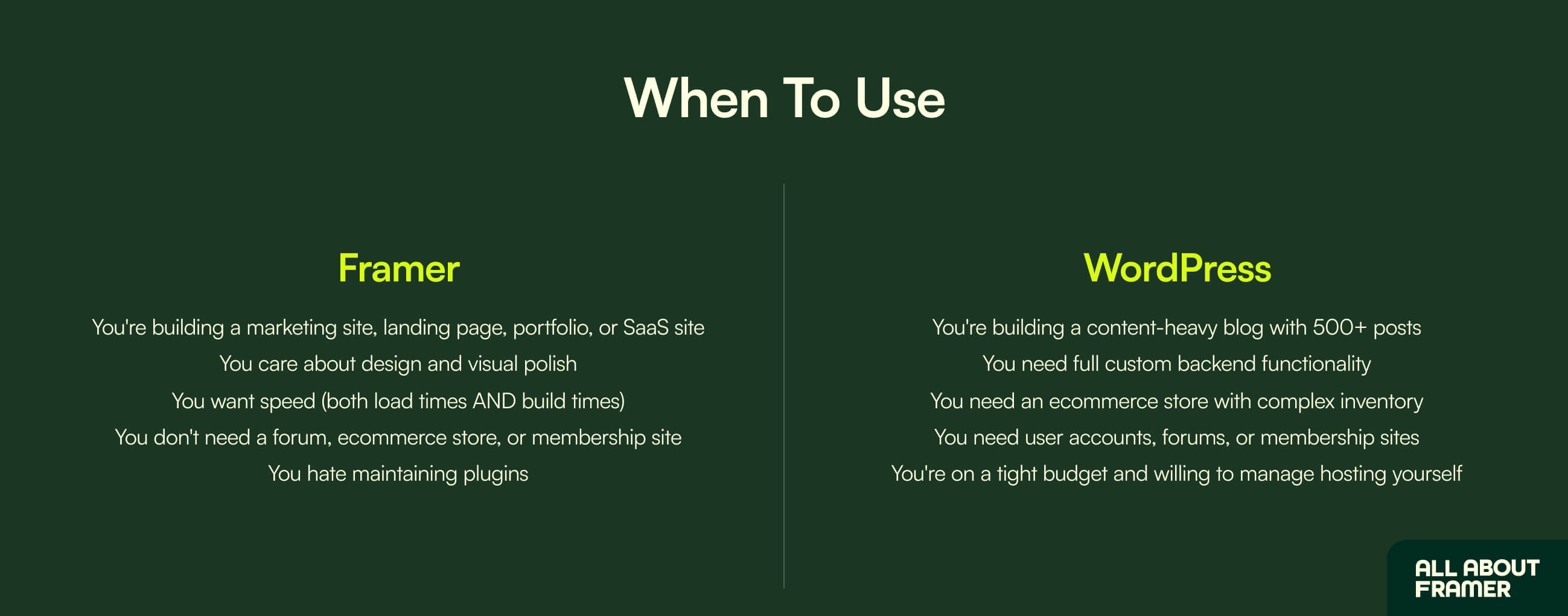
Use Framer if:
You're building a marketing site, landing page, portfolio, or SaaS site
You care about design and visual polish
You want speed (both load times AND build times)
You don't need a forum, ecommerce store, or membership site
You hate maintaining plugins
Use WordPress if:
You're building a content-heavy blog with 500+ posts
You need full custom backend functionality
You need an ecommerce store with complex inventory
You need user accounts, forums, or membership sites
You're on a tight budget and willing to manage hosting yourself
That's the TL;DR.
Now let's get into why.
Speed: The Biggest Difference
This is where Framer absolutely demolishes WordPress.
WordPress sites are slow by default. Always.
You can speed them up with caching plugins, CDNs, and image optimization tools, but you're constantly fighting the system to make it fast.
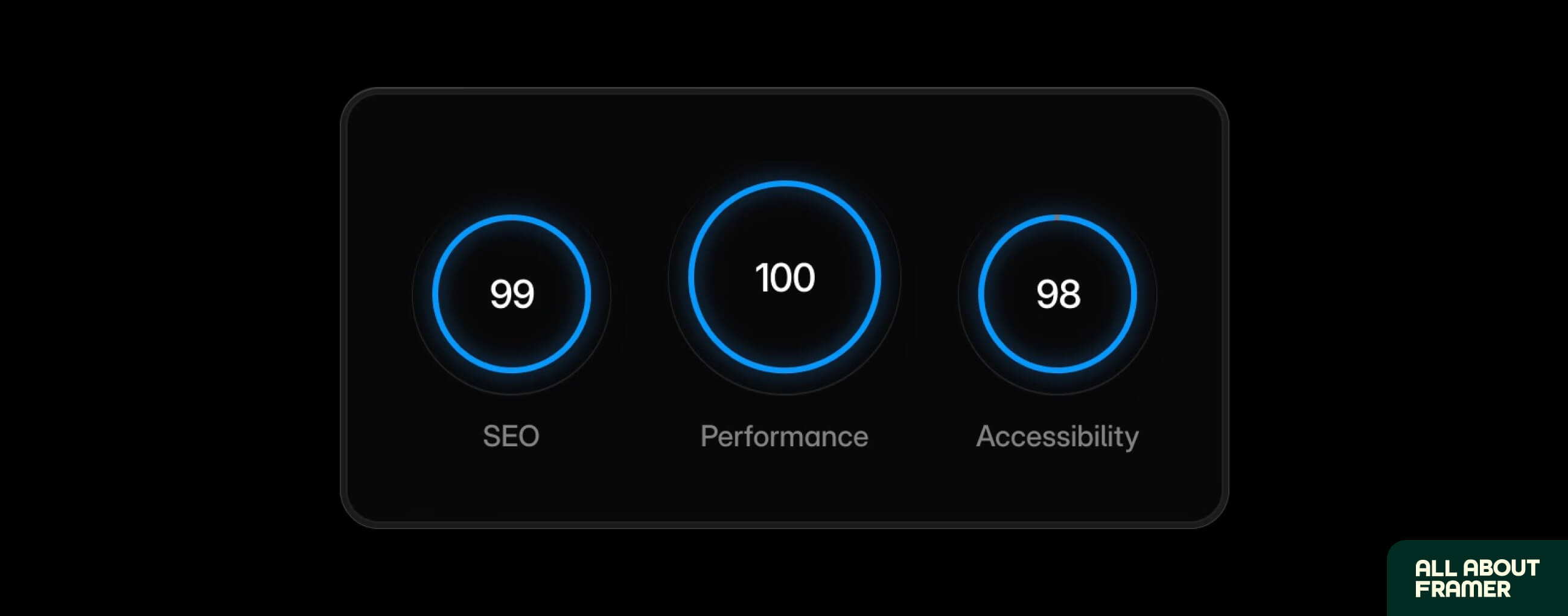
Framer sites are fast by default. They run on Vercel's Edge Network. Globally cached. Built for performance from the ground up.
Real numbers:
Average Framer site:
Page load: 0.8–1.5 seconds
PageSpeed score: 95–100
Core Web Vitals: All passing
Average WordPress site (without heavy optimization):
Page load: 3–8 seconds
PageSpeed score: 40–70
Core Web Vitals: Often failing on mobile
This matters more than you think.
Google uses page speed as a ranking factor.
Slow sites lose rankings.
Slow sites lose conversions.
Studies show every 1-second delay in page load drops conversions by 7%.
For a SaaS landing page, that's the difference between $10,000/month and $7,000/month.
Framer wins this one. Not even close.
Ease of Use: Who's It Actually For?
WordPress is technically free.
But "free" doesn't matter if you need a developer to make it work.
WordPress:
Drag-and-drop builders exist (Elementor, Divi, WPBakery)
But you still need to manage themes, plugins, updates, security, hosting, and PHP errors
Learning curve is steep if you want full control
Time to first published site: 2-5 days minimum (assuming you know what you're doing)
Framer:
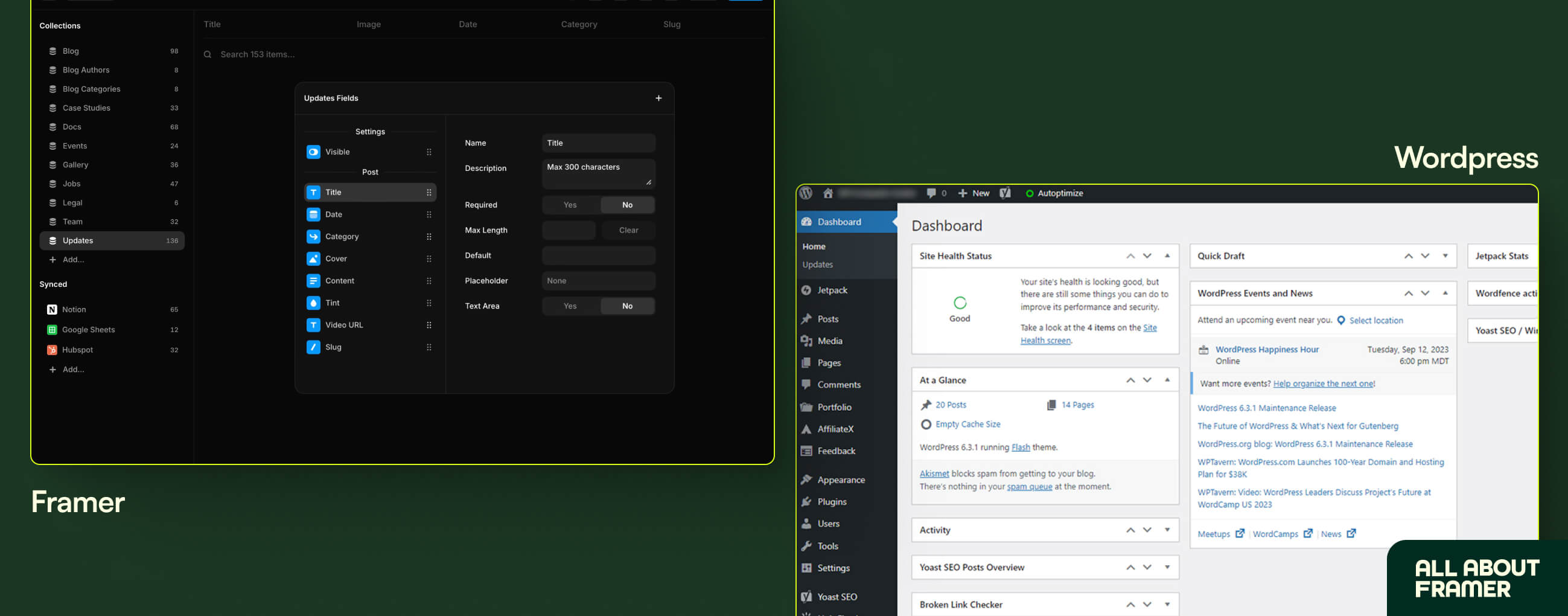
Visual editor that works like Figma
No themes. No plugins. No PHP errors.
Designers feel at home immediately
Time to first published site: 4-12 hours (and that's including learning the tool)
If you've used Figma before, Framer is intuitive within minutes.
WordPress requires understanding a backend, frontend, hosting, plugins, themes, and database structure. There's just more to manage.
Framer wins for designers and creators. WordPress wins for developers who want deep customization.
For most people reading this? Framer is the right call. If you're new to Framer entirely, our complete beginner's guide to learning Framer walks you through it day by day.
Cost Breakdown: The Real Numbers
This is where people get confused.
"WordPress is free!" — yes, the software is free. But running a WordPress site is not.
Let me break it down.
Software, Hosting, and Plugin Costs
WordPress true cost (year 1):
Hosting (decent): $10–$40/month = $120–$480/year
Domain: $15/year
Premium theme: $50–$80 (one-time)
Page builder (Elementor Pro): $59/year
SEO plugin (Yoast Premium or Rank Math Pro): $99/year
Security plugin: $99/year
Backup plugin: $69/year
SSL certificate: $0–$50/year (sometimes included with hosting)
Total: ~$520–$925/year
And that doesn't include hours spent maintaining it, plugin conflicts, security updates, or paying a developer when something breaks.
Framer true cost (year 1):
Basic plan: $10/month per site = $120/year
Custom domain: $15/year (or use your existing one)
Pro plan if you need CMS: $25/month per site = $300/year
Total: ~$135–$315/year
Framer wins on total cost of ownership. WordPress wins only if you're using completely free themes, no premium plugins, and don't value your time.
For most cases, Framer is cheaper AND saves you 5-10 hours a month in maintenance. For the full breakdown, see our Framer pricing guide.
Maintenance and Security
The dollar figures above don't tell the full story. The real cost of WordPress is your time.
WordPress sites need constant care:
Plugin updates (weekly)
Theme updates (monthly)
Core updates (regular)
Security patches (urgent)
Backups (daily)
Database optimization (occasional)
Skip one of these and your site can break, get hacked, or just slow down.
Framer sites need... none of this. Framer handles hosting, security, backups, and updates automatically. You design, you publish, you forget about it until you want to update content.
For solo founders, freelancers, and small teams, this difference is enormous. You save 5-10 hours a month not babysitting a WordPress site.
If your hourly rate is $50/hour and you save 5 hours per month? That's $3,000/year in time saved. Suddenly Framer's annual cost looks even better.
Framer wins this one by a huge margin.
When Framer Gets Expensive: Locales and Add-Ons
Now let me be fair. Framer isn't always the cheaper option.
If you're building a multilingual site, this is where the math flips.
Each additional language (called a "locale" in Framer) costs around $20/month per locale on the Pro plan, or $40/month for any locale beyond your plan's included allocation.
Quick example: a site in English, French, German, and Spanish (3 extra locales) adds $60/month to your plan. That's $720/year just for translation support.
Add a few extra editor seats ($20–$40/editor/month depending on your plan) and the costs stack up fast.
Real-world scenario: An agency on Pro with 3 extra editors and 2 additional locales:
$30 (plan) + $120 (editors) + $40 (locales) = $190/month, or $2,280/year
Compare that to WordPress with the same setup:
WordPress can run multilingual sites via free plugins like Polylang (or $99/year for WPML)
Editor seats? Free. WordPress doesn't charge per user.
Total: roughly $500–$900/year for the same multilingual setup
If you're running a multilingual site with multiple editors, WordPress is genuinely cheaper. There's no way around it.
Framer's pricing is fair for single-language sites with small teams. For multilingual agencies or large editorial teams, the math doesn't favor Framer.
Know your use case before you decide.
SEO: Which One Ranks Better?
This is the question I get most often.
Short answer: both can rank equally well if done right. SEO is about content, not platform.
But there are platform-specific differences.
WordPress SEO advantages:
Yoast and Rank Math plugins handle everything
Schema markup is easy
Tons of plugins for SEO automation
Mature ecosystem, lots of tutorials
WordPress SEO disadvantages:
Slow load times hurt rankings
Plugin bloat affects Core Web Vitals
Security issues can lead to hacks and ranking penalties
Updates can break SEO settings
Framer SEO advantages:
Fast by default (huge ranking factor)
Clean HTML output
Native meta tag and OpenGraph controls
Custom sitemap, redirects, and canonical URLs
No plugins needed (less to break)
Framer SEO disadvantages:
Less granular schema markup control (still possible, just manual)
Smaller ecosystem of SEO tools
Newer platform = fewer tutorials (we're fixing that)
The verdict: Framer ranks slightly better out of the box because of speed and clean code. WordPress can rank just as well, but requires more setup and ongoing optimization.
For a complete SEO walkthrough on Framer, read our Framer SEO beginner guide.
Content, Ecommerce, and Complex Features
This section covers everything you might need beyond basic pages. Blogging. Stores. Memberships. Forums. Where each platform genuinely shines or falls short.
Content Management and Blogging
If your site is content-heavy (think: a blog with 1,000+ posts), this matters.
WordPress:
Built for blogging from day one
Powerful taxonomy (categories, tags, custom post types)
Strong commenting system
Editorial calendar plugins, multi-author workflows
Ideal for news sites, magazines, and content publishers
Framer:
CMS exists and is powerful for design-led blogs
Up to 5,000 items per collection on the Pro plan
Reference relationships between collections
Visual editing (no Gutenberg headaches)
Best for marketing-focused content (case studies, landing pages, product blogs)
For most marketing sites and design-led blogs, Framer's CMS is more than enough. We've built allaboutframer.com with 60+ posts on Framer CMS and it's never slowed down.
For deeper guidance on Framer CMS, read the complete CMS guide.
WordPress wins if you're running a content empire with 5,000+ posts. Framer wins if you're running a marketing site with smart content.
Ecommerce, Memberships, and Communities
Here's where WordPress genuinely wins.
If you need:
A full ecommerce store (WooCommerce, hundreds of products)
Membership site with paid tiers
Forum or community
Booking system
Multi-vendor marketplace
LMS (Learning Management System)
WordPress has plugins for all of this. Framer doesn't.
You can integrate third-party tools with Framer (Shopify for ecommerce, MemberSpace for memberships), but if these are core to your business, WordPress is the better fit.
Most readers of this post don't need any of these features. But if you do, this is the deciding factor.
Most readers of this post don't need any of these features. But if you do, this is the deciding factor.
Final Verdict and Decision Framework
Let me make this simple.
Pick Framer if you're building:
SaaS landing pages (read our SaaS landing page guide)
Marketing websites
Portfolios
Agency sites
Small to medium blogs (up to ~1,000 posts)
Personal brand sites
Product launch pages
Event/conference sites
Pick WordPress if you're building:
News or magazine sites (1,000+ posts)
Ecommerce stores with 100+ products
Membership communities
Educational platforms with courses
Booking-heavy sites (hotels, salons, etc.)
Sites needing deep custom backend functionality
If you're not sure, the answer is probably Framer. It handles 80% of websites people actually build.
The Honest Bottom Line
WordPress was the best option in 2015. It's still the best option for certain use cases (large content sites, ecommerce, membership platforms).
But for most websites in 2026 — marketing sites, portfolios, SaaS pages, agency sites, small blogs — Framer is genuinely better.
Faster to build.
Faster to load.
Easier to maintain.
Cheaper in the long run.
If you're starting fresh, pick Framer.
If you have a WordPress site that's working fine, don't migrate just because. Migrate when the pain of maintenance outweighs the cost of switching.
If you do migrate, redesign while you're at it.
Don't copy your old site pixel-for-pixel. Take the chance to rebuild something that actually represents you in 2026.
Ready to start?
Our 30-day Framer learning guide will get you from zero to published faster than you'd think. And if you want to know how this all turns into income, the complete Framer money guide breaks it down.
Pick your platform. Build something good.
Migrating from WordPress to Framer
Lots of you are asking about migration. Let me address it directly.
Should you migrate?
Yes, if:
Your WordPress site is slow and hurting your business
You're tired of maintaining plugins and security
Your site has fewer than ~500 pages
You don't need WordPress-specific features (WooCommerce, memberships, etc.)
No, if:
You have 1,000+ blog posts (migration is painful)
Your site relies on WordPress plugins that don't have Framer equivalents
You're running a WooCommerce store
Your team is trained on WordPress and switching would cost more than maintaining
[VISUAL 6: WordPress site before vs Framer rebuild after — place here]
How migration works:
Audit your current site — list every page, post, and feature
Identify replacements — what does Framer have for each WordPress feature?
Export content — CSV from WordPress, import to Framer CMS
Rebuild design — don't migrate the design, redesign it (you'll be glad you did)
Redirect old URLs — 301 redirects from WordPress slugs to new Framer URLs
Update DNS — point your domain to Framer
Test, test, test — every page, every link, every form
The migration itself takes 1-4 weeks depending on site size. The redesign is the longest part.
Will it hurt your SEO?
Done right, no. Done wrong, yes. See our full guide on whether migrating to Framer hurts your SEO for the details.
FAQs
Is Framer better than WordPress for SEO?
Framer is slightly better out of the box because of faster load times and cleaner HTML. WordPress can match it but requires more setup and ongoing optimization. For most users, Framer's default SEO performance is stronger.
Can I migrate my WordPress site to Framer?
Yes. You can export content from WordPress, import it to Framer CMS, rebuild the design, and redirect old URLs. Migration takes 1–4 weeks depending on site size. See our migration SEO guide before starting.
Is Framer more expensive than WordPress?
Software-only, WordPress is free. But total annual cost of WordPress (hosting + plugins + maintenance) typically runs $500–$900/year. Framer Basic plan is $120/year, Pro is $300/year. Framer is cheaper in most real-world scenarios.
Does Framer work for ecommerce like WordPress + WooCommerce?
Framer doesn't have a native ecommerce solution like WooCommerce. You can integrate Shopify with Framer for product selling, but if you need complex inventory, multi-vendor, or deep ecommerce features, WordPress + WooCommerce is the better fit.
How much do locales cost on Framer?
Each additional language (locale) costs around $20/month per locale on the Pro plan, and $40/month for locales beyond your plan's included allocation. A site in English plus 3 more languages adds roughly $60/month or $720/year to your base plan. If you're building a multilingual site with multiple editors, WordPress (with free or low-cost translation plugins like Polylang or WPML) is genuinely cheaper.
Can I use Framer if I already have a WordPress site?
Yes. Many people run a Framer landing page alongside their WordPress blog. You can host them on subdomains (framer.yoursite.com or yoursite.com/landing) and keep them separate. Or you can fully migrate. Both work.
I publish free Framer guides, templates, and tutorials at All About Framer. If you'd like help migrating from WordPress to Framer or want personal guidance on building your first Framer site, book a free consultation here.